BiyahekoPay Super POS

Earn every day,
even in low season.

One terminal for bills, e-load, cash in, cash out, card and QR payments. Turn your counter into your community's payment center, and earn on every transaction.

  • 700+ billers
  • ₱12 per cash out
  • No bank maintaining balance
  • WiFi or Super SIM
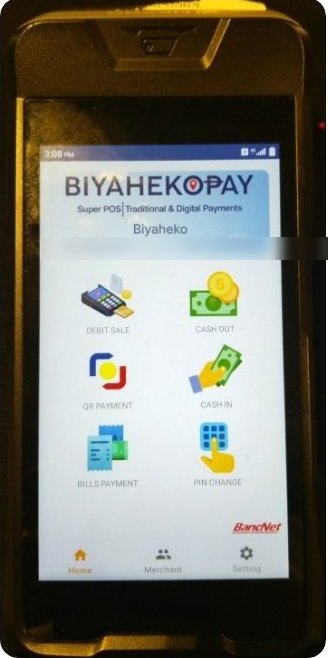
The BiyahekoPay Super POS terminal showing Debit Sale, Cash Out, QR Payment, Cash In, Bills Payment and PIN Change
₱50,000device, features and setup

The presentation

Welcome

One terminal for every payment at your counter.

The BiyahekoPay Super POS lets your customers pay bills, buy load, withdraw or send cash, and pay by card or QR, right at your store, agency or office.

Every daySteady foot trafficBills, load and cash never go on low season
6 waysTo earnShares, fees and referrals on every service
1 deviceMany servicesCard reader, printer and QR in one terminal

What it does

One terminal, many services

The services activated for your account appear on your terminal.

  • 💳
    Debit SaleAccept payment by debit card
  • 🏧
    Cash OutYour customer withdraws cash, like an ATM
  • 📤
    Cash InSend money to a bank account or e-wallet
  • 🧾
    Bills Payment700+ billers: power, water, telco and more
  • 📱
    E-loadPrepaid load for every network
  • 🔳
    QR PhPayments from GCash, Maya and banking apps

The idea

Make your counter your community's payment center.

Everyone who comes in to pay a bill or withdraw cash is a customer for the rest of your business. Someone who pays their electric bill today could book a trip or buy from you tomorrow.

  • Travel agencies
  • Sari-sari and retail stores
  • Pharmacies
  • Online sellers
  • Offices and shops

How you earn

Earn on every transaction

Every service pays you. You keep your convenience fee in full.

50-50Bills and e-loadEarnings shared on every transaction
₱12Cash OutPer ATM withdrawal (up to ₱10,000 each)
0.125%QR Ph, GCash, MayaOf every payment
100%Convenience feeYou set it; show it on your official receipt
₱1,500ReferralPer Super POS sold through you
700+BillersMore reasons for people to visit

Your numbers

What could it earn for you?

Cash out₱0
Convenience fees₱0
QR payments₱0
₱0
a month, before the bills and e-load share

Illustration only, using your own numbers. Actual earnings depend on your customers and the services activated for your account.

Why it fits

Built for small businesses

  • 🚶
    More people at your counterEvery visitor is a potential customer
  • 💳
    Accept card and QR for your own salesNot just cash or bank transfer. For travel agencies: booking payments too
  • 🏦
    No bank maintaining balanceA separate POS wallet, with no top-up fee
  • 📶
    WiFi or Super SIMWorks wherever your counter is
  • 🎓
    Training includedA short course before your first live transaction
  • 💬
    Customer CareMonday to Sunday, 7 AM to 2 AM

Safe by design

Five rules that protect everyone

You handle real money, so every merchant is trained on these before going live.

  1. Check before you confirm: service, amount, account, customer's OK.
  2. Success first, cash second. No cash until the POS says Successful.
  3. Never repeat an uncertain transaction. Verify it first.
  4. The PIN belongs to the customer. You never ask for it or type it.
  5. Always give a receipt.

The package

Everything to start earning

₱50,000Super POSDevice, features and setup
₱20,000ReservationSecures your unit; part of the ₱50,000
FreeDeliveryRight to your store
1 yearWarrantyFor factory defects
₱10,000Custom logoOptional, one-time, unlimited branches
₱500Super SIM, a monthOptional, first month free. Or use WiFi

Installments available through our financing partner. Prices and promos may change; we confirm the latest offer before you pay.

What you'll need

Simple requirements

Everyone

  • Valid government ID of the owner or each signatory
  • Proof of authority if a representative signs (board resolution, Secretary's Certificate or partnership resolution)
  • Merchant Application Form and your settlement account

Plus, by business type

  • Corporation: SEC registration, Articles and By-Laws, latest GIS, Mayor's Permit
  • Partnership: Articles of Partnership, Mayor's Permit, beneficial ownership declaration
  • Sole proprietor or MSME: DTI, SEC or CDA registration, or Mayor's Permit
  • Not yet registered: government ID plus one proof of business, like a geotagged store photo, barangay permit or online store page

How to get one

Six steps to going live

  1. Tell us you're interestedUse the form below or message Customer Care
  2. Reserve your unit₱20,000
  3. Send your documentsKYC and the Merchant Application Form
  4. Pay the balance and signMerchant agreement and settlement account
  5. Delivery and setupAt your store, free
  6. Short training, then go liveBefore your first live transaction

Ready?

Let's turn your counter into a payment center.

Send your details and our team will call or message you with the latest offer, the reservation steps and the installment options.

I'm interested
BiaBiyaheko guide

1 / 11

I'm interested

Get your BiyahekoPay Super POS

Send your details and our team will get in touch with:

  • the latest offer and reservation steps
  • installment options through our financing partner
  • the documents for your type of business

Questions first? Message Biyaheko Customer Care, Monday to Sunday, 7 AM to 2 AM.